
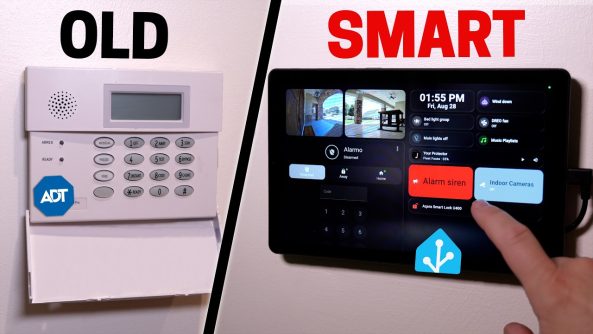
Awesome Tips I Made My Old Security System 100x Better!
I made my old security system smart, with a custom security dashboard!
I made my old security system smart, with a custom security dashboard!
Micro Center is THE Ai Destination:
Sign up for a FREE 128 Gig Flash Drive at Micro Center’s Austin location:
Shop Micro Center’s Back to School Tech Deals:
Visit Micro Center News:
*Links*
Ring alarm keypad 2nd gen:
Zooz Z-Wave siren:
Wire Tracer/Tone Generator:
Konnected Alarm Panel Pro Conversion Kit:
Magnets for Konnected board:
Reolink indoor camera:
UPS:
Konnected 12V to 5V converter:
12V power supply:
Manget mounts:
Lenovo Tab M9 refurbished:
Most inexpensive Android tablets will work for a dashboard, like this Lenovo Tab One:
(affiliate)
Alarmo:
Alarmo-card:
Advanced Ring Keypad V2 Blueprint for Home Assistant (Alarmo):
Konnected Alarm Panel Pro install video:
Konnected video to replace alarm keypad with tablet:
Fully Kiosk Browser:
My smart home favorites:
My smart home shirts!
USA:
International:
FOLLOW ME
Subscribe to Smart Home Solver:
Subscribe to Reed’s Smart Home:
Twitter:
Instagram:
TikTok:
0:00 Intro
0:14 Overview
0:53 Alarmo
3:42 Konnected
7:33 Strange Quirks
8:56 Dashboard mounting
10:24 Dashboard design
12:02 Automations
15:45 Another display?
———
MUSIC
Rinse Repeat by DivKid
Ending song is The End by EVA.
Deals for Days. Big home savings are happening now.

Anyone else here hate hanging pictures around the house? 😬
1:23 ahhhh that magnet alignment!
Didn't know about Alarmo, looks great!
The 'right' way to disable indoor cameras is to hook them up to a smart plug (or their POE input switch). And then hard wire a light to the power input of the camera. If the camera is on, the warning light is on, if the light is off, the camera has no power and can't possibly be doing anything. Turn off the switch to the indoor cameras, or their cameras as you arrive home.
9:25 I didn't understand why you installed a 12V power supply and then a step down converter to get 5V on the other end of the wires. Why didn't you just get a 5V power supply and skip the step down?
That's awesome to see that I think just like you! I used my Aqara FP2 to control my tablet to come on and go off and since it's presence, it stays on as long as someone is in the kitchen!
I just got opencode to create a set of gated sensors so that if the alarm is set and any of my robot vacuums does a clean, the "gate" holds the motion sensors until the vacuum's return the their docks! The door sensors will still trip the alarm….I'm yet to test it but I'm excited to find out. Opencode also did some great work creating dashboards for my 2 vacuum's (1 upstairs, 1 downstairs) so I can reccommend opencode most definitely. Paul Hibbert just post a second video on opencode….it's freakin awesome!
Also I would add a smart plug to the 12-volt power adapter and you can use a automation blueprint to toggle the smart plug whenever the battery gets to a certain percentage and when it drains to a lower set percentage it'll turn the smart plug back on so your tablet battery is not constantly sitting at 100% all the time unless you change the battery saver settings in the tablet to where it only charges it to a certain percentage
Add a Evizalink board to the Honeywell system, rock solid alarm system with smart capabilities and the possibility for professional alarm monitoring, I have had no issues with it in 12 years. Or just use an esp32 and vibe code a esphome custom project, a lot cheaper than the Konnect and more powerful.
Personally, I consider an alarm system too important to be entrusted to home automation systems that were not designed for security. I also believe that if I were burglarized and my alarm failed to go off because Home Assistant decided to update itself and one of the integrations stopped working, it could create issues with my insurance company.
So I let my good old DSC system keep doing its job. It's a real workhorse: extremely reliable, with its backup battery, cellular backup link to a certified monitoring station, and all that. It's a quality system that doesn't give me false alarms.
That said, using it was admittedly pretty basic. So I added an EnvisaLink 4, which allows me to integrate all the functions of my alarm system into my home automation setup. And if the home automation system crashes, I still have the good old yellowed keypad hidden away in the closet!
Yes, even my cameras turn toward the walls, including when I disarm the system using the old yellow keypad! 😄
Security should be treated like a fully separate appliance rather than an add-on. Just like my leak and fire protection, my security system has its own dedicated controller with battery backup, and connection to HA just for ease of access. You get the best reliability that way since the appliance controller's only job is to handle that appliance.
IMHO Home Assistant should be a convenience tool for integrating smart home tech, but not the central controller. Yes it means "extra" hardware but there's a word for that in the security industry: redundancy. It's what keeps a system running.
Suggest you get the home assistant MCP server and use Claude to troubleshoot your sensor instability. Fable 5 will blow you away!
10:18 for the tablet mount I would highly recommend you get the 3M Velcro adhesive strips. It makes the tablet flush and gets rid of that wobble when you press on the screen.
How can I send you a picture? I have two ideas that can vastly improve this setup for the tablet.
Ups info set up short .. Chromebook laptop budget friendly dual camera non windows recommendation
Ive just done the same thing! Alarmo is great. Great tip re motion sensors too lol Reolink in the privacy mode settings also gives you a privacy mode preset position outside of setting an additional "preset". They a really cool cameras!
A VERY good video. Another excellent teacher video of how to do it ourselves. Thank you..
The way we use motion sensors is that they need to "double knock". If 2 areas are active (on) then it's more then a spider walking past 1 sensor.
To do this we created templates that count the areas with motion and occupancy.
This and a condition to ignore when the vacuum was in state "returning to dock" meant no more false alerts.
This looks great! What alarm panel are you using? I really like that it shows the arming time. I assume it also shows the delay time.
I use the konnected board in my home. It’s easy. I use Alarmo to handle the keypad logic and NodeRED for the notification logic. It’s smooth. Love it.
The ring keypad is awful lol. It constantly disconnects. You should also look at kc868-a16v3. It is super cheap and has built in rf receive and transmitter
Swapping a Honeywell system for a ring alarm isn’t what i would call more reliable 😂
I recently installed motion sensor from Unifi and they have pet immunity animals under 0.5 m tall….maybe those not detect your robot vacum.
Unifi's system is AWESOME!!!
Konnected is brilliant. I use it to have wired door sensors so I don't have to deal with batteries and wireless protocols.
that's the exact same micro center I go to we got to live close
Link for the pressure sensor under your mattress?🗿
For the reolinks, you don't actually have to set two PTZ. When you're looking inside the reolink app for the privacy mode, you can set a particular position for privacy mode so that it goes to it every time privacy mode is enabled.
you can never escape the wife (borat voice)
what are you using to run Home Assistant ?
The real question is, does this home monitoring system get monitored by external service services to call the police and such?
That is the only thing that’s holding my wife back from letting me switch it to Home Assistant. I haven’t found any service. I can monitor things for you like burglary and fire.
For your wired motion sensors, it sounds like you might have had your motion sensors on one circuit and they were underpowered? Voltage drop causes them to go offline?
What a bummer that the power cord is on the side of the tablet.
13:15 If you go to your camera's settings in the Reolink app then Privacy Mode on PTZ cameras their should be the option for "Point Settings". Atleast their is for all of my Reolink PTZ cameras…
Hey for cellular backup, you should consider getting a sim card from Shield Internet.
Then theres different unifi 5g devices u can buy. My network is setup to failover to 5g if my main internet ping fails for more than 5 seconds.
2:42 I've been wondering for weeks if you use Ring. Given you host your own video on your server, I was doubtful but still confused why you had ring hardware. Now I know! 😄
Unless the tablet does not have an internal battery, I would put a smart plug to control when the tablet is charging. As others can say, overcharging a battery can lead to expanding battery, and would then be a fire hazard.
Well, it's a real shame. I didn't know about the connected stuff until now. I took out my entire pre-wired alarm system last summer.
How come you didn’t use Unifi alarm hub kit?
Looks cool! How does “away” mode work when you two go out for a date night and leave the kids home with a babysitter? That’s the scenario I keep coming back to when automating things by relying on geofencing cell phones….
The Fall Of Best Buy, and The Rise Of Micro Center. Someone should do a video
Should have gone with EyezOn UNO, central monitoring over IP and LTE/Cellular for $4 a month. Works with any cheap DSC wireless sensor and plugs into your hardwiring. Also had a great Home Assistant integration.
I prefer DSC for commercial grade and the EyezOn DUO, but UNO is easier.
That wobbling dashboard, just add two more magnets to the sides…
Great Video…
I have a Honeywell vista fire alarm panel / security system the one you have is a normal Honeywell vista, rebranded by ADT, probably a Honeywell 15p or 20p depending on the pins on the board, I can't use it because I don't have a keypad, but yeah, they are interesting, but older
Perfect timing as we are moving to a new house and I am trying to workout the best implementation of a security system and security mounted displays and locations in the house.
Thank you!
If someone breaks in when you're home – you don't get the recording
Does this remind u of Home Alone at 11:27?
This reminded me of Home Alone when it's about security.
Any professional monitoring services integrate with your setup?
I get a nice discount on my homeowners insurance that is more than my monthly subscription to a DIY friendly service that uses traditional alarm hardware.