
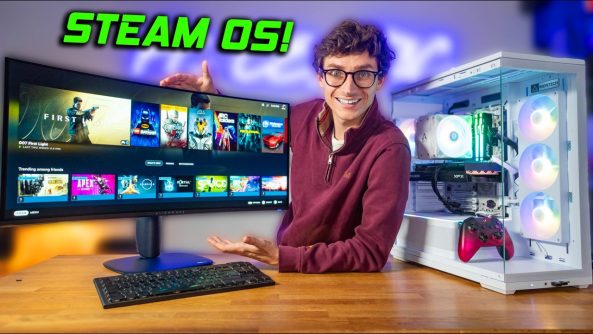
Awesome Tips Forget The Steam Machine – This Is WAY Better! 💪
Steam Machine… But WAY Better! This Budget gaming PC uses Steam OS, an RX 9060 XT and the Ryzen 7700X3d CPU! Join PC Centric for this SteamOS Gaming PC Build with gameplay benchmarks! ⭐ PCSpecialist: (AD)
Steam Machine… But WAY Better! This Budget gaming PC uses Steam OS, an RX 9060 XT and the Ryzen 7700X3d CPU! Join PC Centric for this SteamOS Gaming PC Build with gameplay benchmarks! ⭐ PCSpecialist: (AD)
🎮 Join The PC Centric Discord!
🛒 Product Affiliate Links* 🛒
Montech TG3 Case:
Aorus B850 Eagle ICE WIFI:
Ryzen 7700x3d CPU:
Arctic Freezer 36 Cooler:
16GB DDR5 RAM:
RX 9060 XT ICE Graphics card:
1TB Silicon Power SSD:
650W Power Supply:
📺 Our 4K QD-OLED Gaming Monitor:
🎮 My Personal PC Gaming Setup on Amazon Storefront:
⭐USA:
⭐UK:
(*When you buy through an affiliate link, PC Centric may receive a commission on the sale – as an Amazon Associate I earn from qualifying purchases)
Products provided out for review without direction or payment from the manufacturer for inclusion in this video.
Follow @PcCentric on Twitter
Add PC Centric on Instagram:
Like PC Centric on Facebook!
—
Music from: Epidemic Sound: (Affiliate)
—
All images used in this video are used in good spirit, and are believed to be ‘fair use’. If you feel an example of your work has been wrongly published, please contact [email protected].
PC Centric is a participant in the Amazon EU Associates Programme, Amazon Services LLC Associates and Amazon CA Associates, affiliate advertising programmes designed to provide a means for sites to earn advertising fees by advertising and linking to Amazon.co.uk, Amazon.com & Amazon.ca and other global Amazon Stores
00:00 Build Your Own Steam Machine!
01:46 Who Is SteamOS For?
03:29 CPU Installation
05:20 RAM Installation
07:09 SSD Installation
08:03 CPU Cooler Installation
11:29 Case Overview
13:05 Motherboard Installation
13:43 Graphics Card Installation
16:41 Connecting Case Cables
17:29 PSU Installation
19:30 Installing SteamOS
22:14 A Big Issue…
23:35 How To Work & Setup SteamOS
28:15 A Windows Game on Steam? – Halo Infinite
31:46 Non-Steam Game Testing – Witcher 3
34:17 Lego Batman Gameplay
37:00 007 First Light Gameplay
40:06 Is SteamOS Right For You?
Deals for Days. Big home savings are happening now.

Full Parts List and Current Pricing!
Montech TG3 Case: https://geni.us/UFdY9
Aorus B850 Eagle ICE WIFI: https://geni.us/kR5a6JO
Ryzen 7700x3d CPU: https://geni.us/ylh6
Arctic Freezer 36 Cooler: https://geni.us/f7YUR
16GB DDR5 RAM: https://geni.us/obToge
RX 9060 XT ICE Graphics card: https://geni.us/xFjhaA9
1TB Silicon Power SSD: https://geni.us/O5BGpV
650W Power Supply: https://geni.us/kqn0PG
📺 Our 4K QD-OLED Gaming Monitor: https://geni.us/75DN
Affiliate Links
What is wrong with the lighting?
Just wanna say I love these videos a lot! Been really interested lately in building my first ever living room PC and then chucking SteamOS on it and these videos are super interesting and make the whole thing less daunting. Thanks!
Air coolers are so big these days that it makes the whole system look ridiculous. ARM CPUs being the norm can’t come fast enough.
When you kid on your other people wineing it's so funny yet annoying 😂
I have a built myselfna steam machine and used OpenRGB which works great until you put it to sleep or restart. I have spent hours trying to get this to reapply the rgb, but no luck so far. Also struggling on controller wakeup and next on my list is cec.
If someone can work out the magic sauce for these things it would be a very popular video as lots of people building there own couch PCs.
So we need a guide to…
Persistent RGB
Controller Wakeup
CEC tv control
BTW you need a display port 1.4 to hdmi 2.1 adaptor to get gaming modes to persist on modern TVs. And ugreens adaptor might be the special source for cec.
But yeah not just a install steamos on a desktop build, but build and configure a steamos couch pc connected to a TV please
I have Steam on my existing PC and didn't have to spend a dime to build anything. I can play all their games at 1440p plus I have all my existing programs and files and hardware and I have access to other game sites that aren't Steam related. I can also load emulators and mods for games without worrying I'm going to gork my system. I could even migrate the system to my 65" 4K TV and play in that if I wanted to. The thing you built is way, WAY more expensive than the Steam Machine and completely out of the realm of possibility for like 90% of your audience! It's not even "apples to apples" bro! And just an FYI! The whole reason to build your own Steam Machine "substitute" is to SAVE money, not blow a month's salary on building a way overblown system no one but you can afford…
Be very careful with what networking hardware you have on the motherboard that you buy if you want to use Linux. It's easy to encounter wifi hardware that doesn't work at all or works poorly. My mediatek chip is very crap.
Every once in a while i have to unplug my controller and plug it back in even on windows 11 so idk
modern cases not having a unified front panel header in 2026 is a crime
Sometimes my wired network adaptor wont show up when i install certain Linux distros. The fix to getting them working was to turn the pc completely off, then unplug it from the wall, hold the power button in for 30 seconds to empty the capacitors. Then plug it up and switch it on, after that my nic and bluetooth would work again. Had that problem with my old Eagle board and sometime on my Asrock, it only happens after first power up after an install. after doing the power trick it works fine
Yeah it SteamOS usually can't use Ethernet until it updates the first time. Also you can't use a 2nd SSD for games without mounting the drive through the desktop mode after every boot, As soon as they update it to recognize more than 1 SSD i'll be moving to SteamOS full time.
If you're not aiming for small form factor, you're missing the point with Steam Machine analog. ATX or mATX aren't the move, ITX in cases 15L or less, ideally 10-12L or less.
Not a fan of the Steam Machine, but I have one question, and nobody has answered it. WHY? If the Steam Machine should cost $700, everyone makes content about it making a better PC than the Steam Machine, which is bigger and at the same cost or more expensive by a bit than the Steam Machine itself. Everyone is complaining about the price and saying it should be $600 or $800 (the top-tier machine) at most? An interesting video should be: Build a Steam Machine that uses NEW parts and is exactly the same size and delivers exactly the same performance, THE SAME performance as an ORIGINAL top-tier Steam Machine, on a $600 / 800 budget, tops. Not used parts. Brand new parts. Thank you.
That is a SteamOS PC… not a Steam Machine. Its also gigantic… yuck.
Running SteamOS (also testing Bazzite and Nobara) on a 7800X3D and a 9070XT and it is awesome!
heres a scenario. your a normal human who has a tv and a pc. you have two ssds. you want to hook up your pc to your tv. you find a problem. who wants to use kbm on a tv? you find a solution. steam OS. dual boot exists for a reason. if your games require that good of an anti cheat you shouldnt play them on a tv anyway. use both windows and steam.
If you have issues with Ethernet/Internet from my Arch Linux exp I think you just need to refresh "NetworkManager" if this happens to anyone go to the Desktop or a TTY and type "systemctl restart NetworkManager" or nmcli networking off, ENTER, nmcli networking on, ENTER. (Do not type ENTER hit it)
Edit: If you can't get into Live Desktop before the internet stuff try entering Ctrl + Alt + F1 or do that but try F2 or F3 sometimes these work while F1 doesn't this will bring you to a TTY on Arch Linux(SteamOS) Distro's usually.
steam deckOS
I'm about to be building a micoatx steam OS console PC for my living room.
I'd like to see a real Steam Machine competitor: pick one level of Steam Machine, that's the budget. Match or beat everything (probably impossible to match/beat the form factor, but at least a SFF machine).
I thought I wasn't working properly yet
Would it be okay to pair the 7800x3d with the arctic freezer 36 air cooler shown in the video? any help would be appreciated. I can't seem to choose between it and the arctic freezer 360 AIO.
Full ATX PC running Steam OS and "Steam Machine" are not the same thing.
As a person who does more than game on their computer, I would say this is not for me, but it's cool.
I'm using Bazzite, and I'm waiting for them to release another version of SteamOS where I won't have network issues when setting it up. What I don't like about Bazzite in gaming mode is that shortcuts like 'CTRL+1' or going back to the Steam menu interfere with Gamescope's shortcuts, forcing me to use a controller—which I dislike because I want to use it 100% with a keyboard and mouse without relying on a controller. But hey, everyone's experience is different.
I am using nvidia still waiting for it
For the Wi-Fi problem, try restarting the Network Manager: Ctrl+Alt+F4 "sudo systemctl restart NetworkManager" then return to SteamOS with Ctrl+Alt+F1
I think a Valve engineer or freelancer did alot of work on optimizing for 8gig vram on Linux or Steam. Don't remember her name but 8gig vram should (in theory) be better on Linux. But buy a 16gig vram card if you can so you can just avoid the entire 8gig mess 🙂 – Natalie Vock and she improved memory management on Linux! had to look it up 😀
Cachy OS or bazzite is better.
at this point, enough of these videos are online. come on guys!!
Full ATX builds are the ultimate in "future proofing", not that it is a real thing 😛
The most likely thing you are going to want down the line is more storage, faster usb and faster networking and you have the space for the add in boards to do it. Thinking you're going to upgrade to a 9950X3D2 in a couple years is simply wishful thinking for 99.99% of PC users. The sales numbers on high end hardware proves that.
May try that case for the next PC I build to sell. I hate fishtank cases myself but I'm not building it for me.
If you live near a microcenter check into bundles for AM5 bundles.. 16GB of ram costs about as much as a bundle with a cpu, 16gb ram and motherboard.
I don’t agree with even mentioning the steam machine in this video. This is not a steam machine substitute this is just a PC build.
THX for the SteamOS content
nice i´m hyped for this for building it myself